Quick Answer
FOB stations handle your gear, crafting, boss hunts and progression. Some unlock with DMZ levels, one with Orders. The 3D Printer opens at DMZ Level 2, Vendor at 5, Gunsmith at 10, Dog Tag Case at 20, and the Boss Board after your second DMZ Order. Get into the MW4 DMZ FOB from the DMZ main menu. Everything else there is open from the start.
What does each FOB station do and when does it unlock?
The FOB is where you store loot, set up your Operator, craft gear and track progress between runs. Some stations are open right away. The rest need a DMZ level or a finished Order.
Go into the Forward Operating Base from the DMZ main menu and walk around to reach each station.
Open from the start:
| Station | Function |
|---|---|
| Operators | Active Duty selection and Trait upgrades |
| DMZ Orders | Objectives and rewards |
| Stash/Loadout | Loot storage and deployment equipment |
| Firing Range | Weapon testing |
| Survival Kits | Supply pack unpacking |
| Bounty Leaderboard | Most Wanted and bounty hunter rankings |
| DMZ Progression | DMZ level rewards and station unlocks |
| Events | Active event challenges and unlocks |
| Deploy | Deployment selection |
The rest open here:
| Station | Unlock requirement |
|---|---|
| 3D Printer | DMZ Level 2 |
| Boss Board | Second DMZ Order completed |
| Vendor | DMZ Level 5 |
| Gunsmith | DMZ Level 10 |
| Dog Tag Case | DMZ Level 20 |
What they're for:
| Station | Function |
|---|---|
| 3D Printer | Equipment crafting and FOB upgrades |
| Boss Board | Lieutenant intel and Commander information |
| Vendor | Weapon and equipment purchases |
| Gunsmith | Weapon building and customization |
| Dog Tag Case | Extracted enemy Operator dog tag display |
Want the Boss Board? Work through your DMZ Orders and story missions. It unlocks off Orders, not a DMZ level.
Station unlocks run off your DMZ level, which is separate. Multiplayer and Warzone XP don't raise it. DMZ XP from a run still counts even if you fail to exfil.
How do you craft gear and upgrade the FOB?
Use the 3D Printer from DMZ Level 2 to craft gear, make special ingredients and print permanent FOB upgrades.
The printer sits among the FOB's tents and buildings.
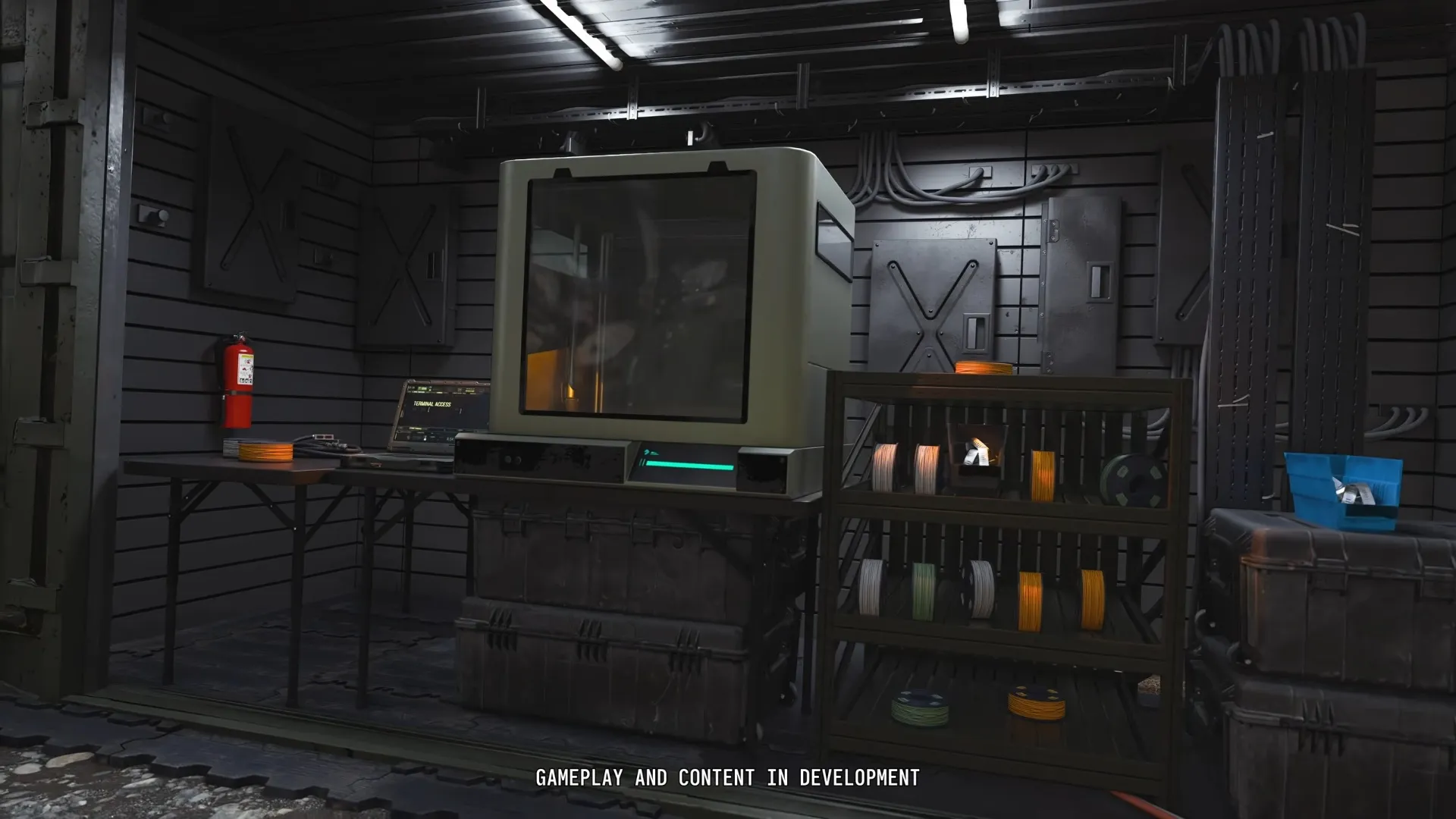
A printer-like machine stands among tents and larger FOB buildings.
Shown at 01:17 in Geeky Pastimes’s video.- Open the 3D Printer and highlight what you want.
- Check its Recipe, Resources and 3D Printer Ingredients.
- Go get what's missing. Ingredient counts turn green once you have enough.
- Craft it, then send it to your Stash or put it straight on your Operator.
You unlock Recipes through DMZ levels, DMZ Orders, or by extracting with a Recipe you looted. Opening the printer doesn't unlock the whole menu at once.
Resources break down into Synthetics, Electronics, Chemicals and Metals. Those totals don't take Stash slots. Ingredients stay as whole items, so move extracted ingredients into your Stash to free up Backpack space.
For base upgrades, pick Upgrades instead of a gear Recipe:
| Upgrade | Benefit |
|---|---|
| Bank | Increased cash capacity |
| Stash item capacity | More item storage |
| MIA recovery | Recovery discounts |
| Stash weapon capacity | More weapon storage |
| Ingredient printing | Rarer ingredient crafting |
FOB upgrades are permanent, but each one takes several prints. Plan the ingredients for one upgrade at a time. One print won't finish it.
One player's tip: look through the Recipes you want before you decide what loot to grab. You can pin Recipes and ingredients so the ones you need get marked during a run. The printer can also point you to general spots to find materials.
How does the Boss Board work?
The Boss Board opens after your second DMZ Order. It sells Lieutenant intel and shows info on Commanders.
Lieutenant intel
Finish the right challenges to unlock a Lieutenant's intel, then pay DMZ Cash before you deploy. Intel you buy lasts one deployment.
To move the Boss Board forward, extract with a Lieutenant Dog Tag Case. It counts whether you killed the Lieutenant yourself or took the case off another player.
The board also has Lieutenant kill and dog tag extraction challenges. One player saw separate challenges for killing Lieutenants and for extracting their dog tags again and again.
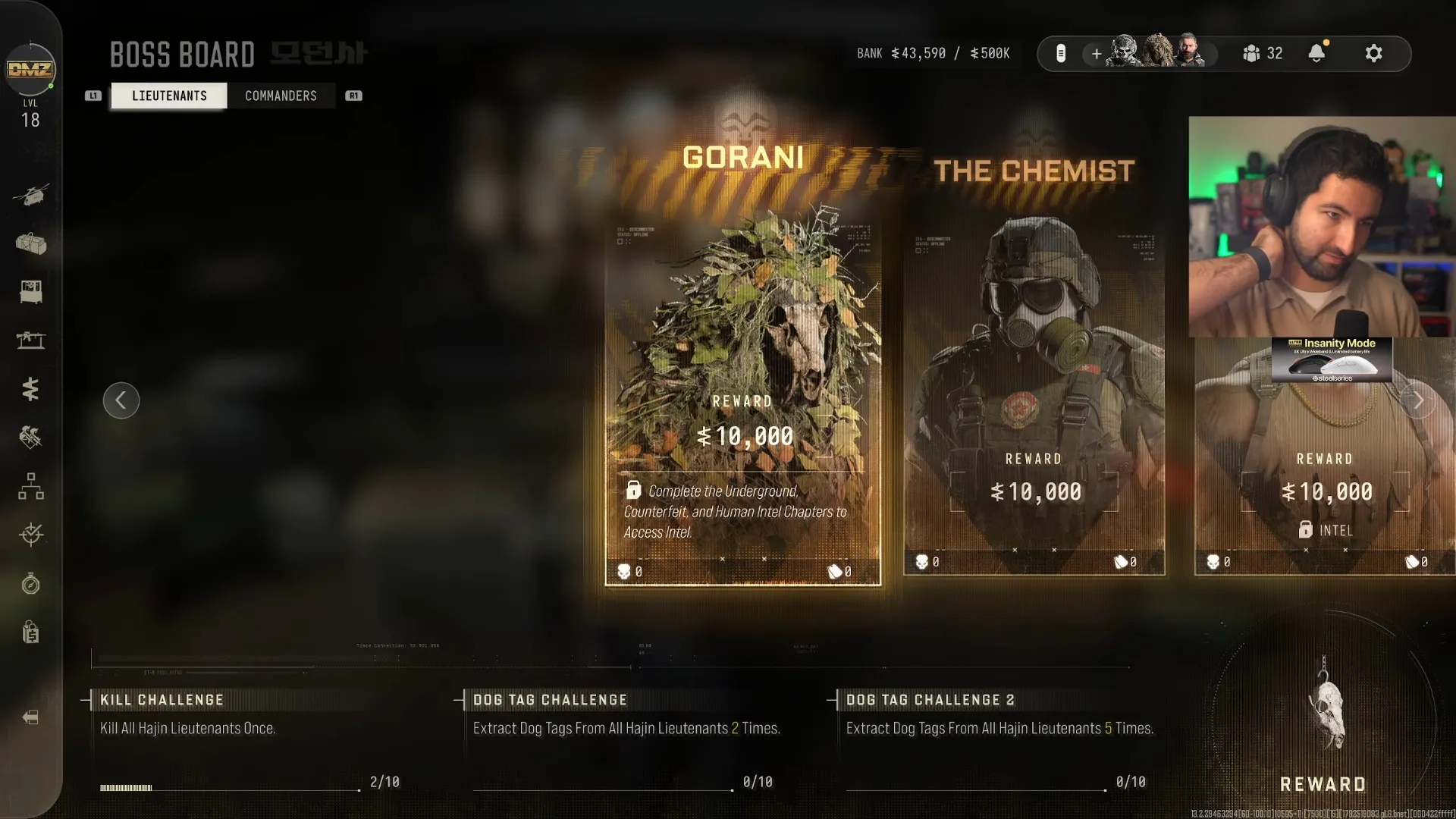
The Boss Board lists Lieutenant kill and dog tag extraction challenges.
Shown at 320:44 in MrDalekJD’s video.Grabbing a Lieutenant Dog Tag Case broadcasts your position to rival squads. Go straight for exfil, don't hang around looting. This boss objective is not the same thing as the FOB's Operator Dog Tag Case display.
Commander information
The October 9, 2026 description says Commander info is free, with no intel to buy. An undated player account, read on October 24, 2026, says you buy intel for both Lieutenants and Commanders.
Check what the Boss Board actually offers before you save cash for Commander intel. Nearby Commanders show on your Tac Map, and your Team Leader warns you when one is close.
Should you use the Vendor or Gunsmith?
Vendor if you want ready-made gear fast. Gunsmith if you want to build and tune a specific gun.
Vendor: fill gaps in your equipment
The Vendor opens at DMZ Level 5 and sells weapons and gear for DMZ Cash. Handy when you need to jump back in fast or can't print what you need.
Stock rotates. Higher DMZ levels get you better gear, and printed Vendor upgrades add more to buy. Check what's in stock before you plan a purchase.
Gunsmith: build a specific weapon
The Gunsmith opens at DMZ Level 10. You pay DMZ Cash to build guns and buy attachments. Which attachments you can get depends on weapon level, which is shared between Multiplayer and DMZ.
Extract with a gun and you get that one gun to modify. To buy its base weapon again and again, you have to extract its Weapon Manual. Losing a looted gun doesn't leave its base weapon unlocked for purchase.
Camos and Stickers are free to apply. Don't count them against what you spend on building guns and buying attachments.
Test your gun at the Firing Range before you deploy. It's in the wooded grove between the Gunsmith and the Vendor, with targets from under 10 meters to over 100 meters out.
How should you manage the Stash and other FOB stations?
Keep the gear you want in the Stash, take only what you need on a run, and leave Survival Kits closed until you need what's inside.
You start with:
| Storage | Initial capacity |
|---|---|
| General Stash items | 40 |
| Weapons, counted separately | 12 |
All your Active Duty Operators share one Stash. After you extract, move spare gear and crafting ingredients out of your Backpack before the next run. Merge stacks to keep things tidy.
Stash items stay at the FOB. Anything in your Backpack outside Secure Slots is lost if you fail to exfil, so taking spare crafting ingredients back into Hajin puts them at risk.
Unopened Survival Kits stack forever in their station menu. Opening one dumps everything into your Stash, so wait until you need the gear if space is tight.
At Operators, pick your Active Duty Operator and spend Trait Points. At DMZ Progression, check the separate 1–70 DMZ reward track and what unlocks next. Check Events for challenges while an event is running.
The Bounty Leaderboard shows the top 50 Most Wanted players and the top 50 bounty hunters, with global and friends views. The Dog Tag Case, open at DMZ Level 20, shows the enemy Operator tags you've extracted. You can see each tag's rarity, the victim and killer names, and the date and time of the kill. More progression raises bounty payouts, and printed upgrades add display slots.
Ready? Deploy gives you Story Missions, Dynamic Operations or Free Roam. Before you take valuable ingredients or a Lieutenant case into your next run, check how to exfil and use Fulton so you get them home.
FAQ
3D Printer at DMZ Level 2, Vendor at 5, Gunsmith at 10, Dog Tag Case at 20. Finish your second DMZ Order for the Boss Board. Everything else is open from the start.
Open the 3D Printer's Upgrades category and print the upgrade you want with its materials. Upgrades are permanent and take several prints each.
No. Multiplayer and Warzone XP don't raise your DMZ level. You need DMZ XP from runs to hit the station unlocks.
Lieutenant intel you buy lasts one deployment. You have to finish that Lieutenant's challenges before you can buy it.
40 general items plus 12 weapons in separate storage. All your Active Duty Operators share that Stash.
No. Extracting a gun gives you that one gun to use and modify. Extract its Weapon Manual to buy the base weapon again and again.